Entries: SNG Notification Manager
Entries table
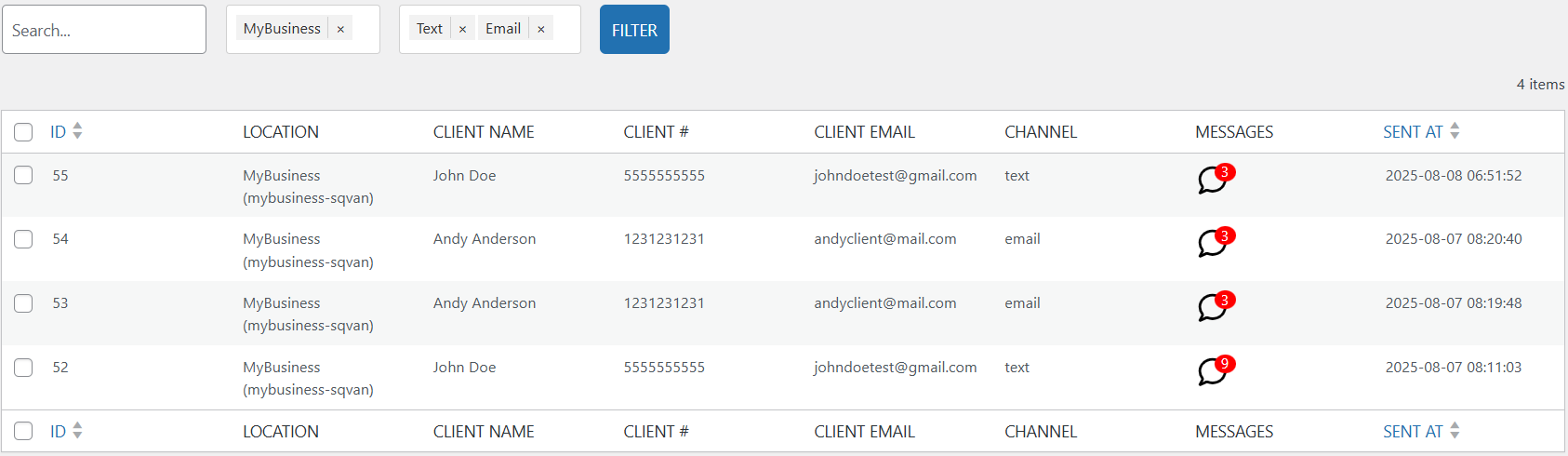
The Entries table displays a list of client conversations, including details about when and how each message was sent. This view helps you quickly locate and review communication history.
Table Columns
- ID - A unique identifier for the conversation entry.
- Location - The business location associated with the message.
- Client Name - The name of the client who received the message.
- Client # - The client's cell phone number.
- Client Email - The client's email address.
- Channel - The method used to send message (text or email).
- Messages - Shows the number of messages in the conversation.
- Click the speech bubble icon to open the conversation view and see all messages exchanged.
- Sent at - The date and time when the message was sent.
Searching and Filtering
- Search Bar - Enter any part of a client's name, email address, or phone number to quickly locate matching entries.
- Filters - Use the dropdown filters above the table to refine results:
- Select Locations - Shows only entries for selected business locations.
- Select Channels - Allows filtering by message type, such as Text or Email.
- After selecting filters, click the Filter button to apply them.
- To reset the list, remove the applied filters and search terms.
Screenshots